www.sigma360.comhs-fshubfsSigma_360_Logo_white_transparent

Trusted AI that drives efficiency & reduces risk. Start now.

Get AI-powered risk intelligence with a quick guided start. No software to install. Just a short onboarding session, then hands-on access.

Free for 30 days 

Start now. Explore at your own pace.

1

Book a short onboarding session


Start your free trial and we'll tailor your training to your needs. You get relevant results, right away.

2

Access your free trial environment


You’ll have hands-on access to Sigma360 to explore the platform at your own pace.

3

See how it accelerates your workflow


Complete searches, review AI-powered insights, and learn how Sigma360 makes your day-to-day risk and compliance work faster, easier, and more thorough.


Start Your Free Trial

Accelerate real use cases, not just a demo.

During your free trial, you can:

  • Search entities and counterparties across global risk data
  • Review AI-powered summaries that highlight relevant risk
  • Navigate an intuitive interface built for speed and clarity
  • Understand firsthand how Sigma360 reduces noise and saves analyst time
Start now to see how Sigma360 can add value and save time for your team.
Why start with onboarding?

A short onboarding session helps you:

  • Focus on risks that matter most to your business
  • Accelerate your evaluation
  • Get value from the platform right away

Once you're set-up, you can explore the platform independently for 30 days.


Trusted Worldwide

  • Sigma-Ratings-payxpert_logo_white
  • Sigma-Ratings-Magnetar_Capital_logo_white
  • Sigma-Ratings_smileid_white
  • Sigma-Ratings-Sphera-white-logo
  • MIT Logo_white transparent1
  • Sigma-360-Customer-Logo-Kalita

Detect risks and scale fast, with confidence

Sigma360's AI-powered, always-on risk intelligence scales with your business, transforming vast data streams into precise, actionable risk signals. Eliminate critical threats before they become regulatory or reputational liabilities.

100B+

More Data Than Legacy Providers

Unmatched accuracy & depth for strategic decision-making

150+

Corporate Registries

From startups to Fortune 500 companies across industries

93%

Reduction in False Positives

Improves accuracy and saves time to case resolution

24/7

Real-Time Alerts

Always-on screening flags risk the moment it emerges, so you can act before it escalates

Rectangle-246

Try Sigma360 Risk-Free

See the value before you commit. Start a no-risk free trial of Sigma360 today and see how it adds value to your compliance program.

Complete risk intelligence with deep visibility and regulatory expertise

Access a complete view of risk including media, sanctions, PEPs and more through real-time data visualizations and customizable views, enabling your team to act with confidence.

Focus on critical threats. Our customizable platform uses contextual risk scoring and intelligent filtering to surface high-impact events, reducing alert noise up to 93%.

From implementation to daily operations, our dedicated team moves at your speed. We provide personalized training and industry expertise that understands your business inside out.

Expand confidently with Sigma360. Instantly adjust filters and workflows through simple controls. No coding, no downtime, no limits to your growth.

Sigma360 engages in ongoing dialogue with regulators, and their input directly shapes our innovation. Our solution sets the compliance standard with unmatched efficiency and context.

Logo Newsletter Holidays

How to Get Started

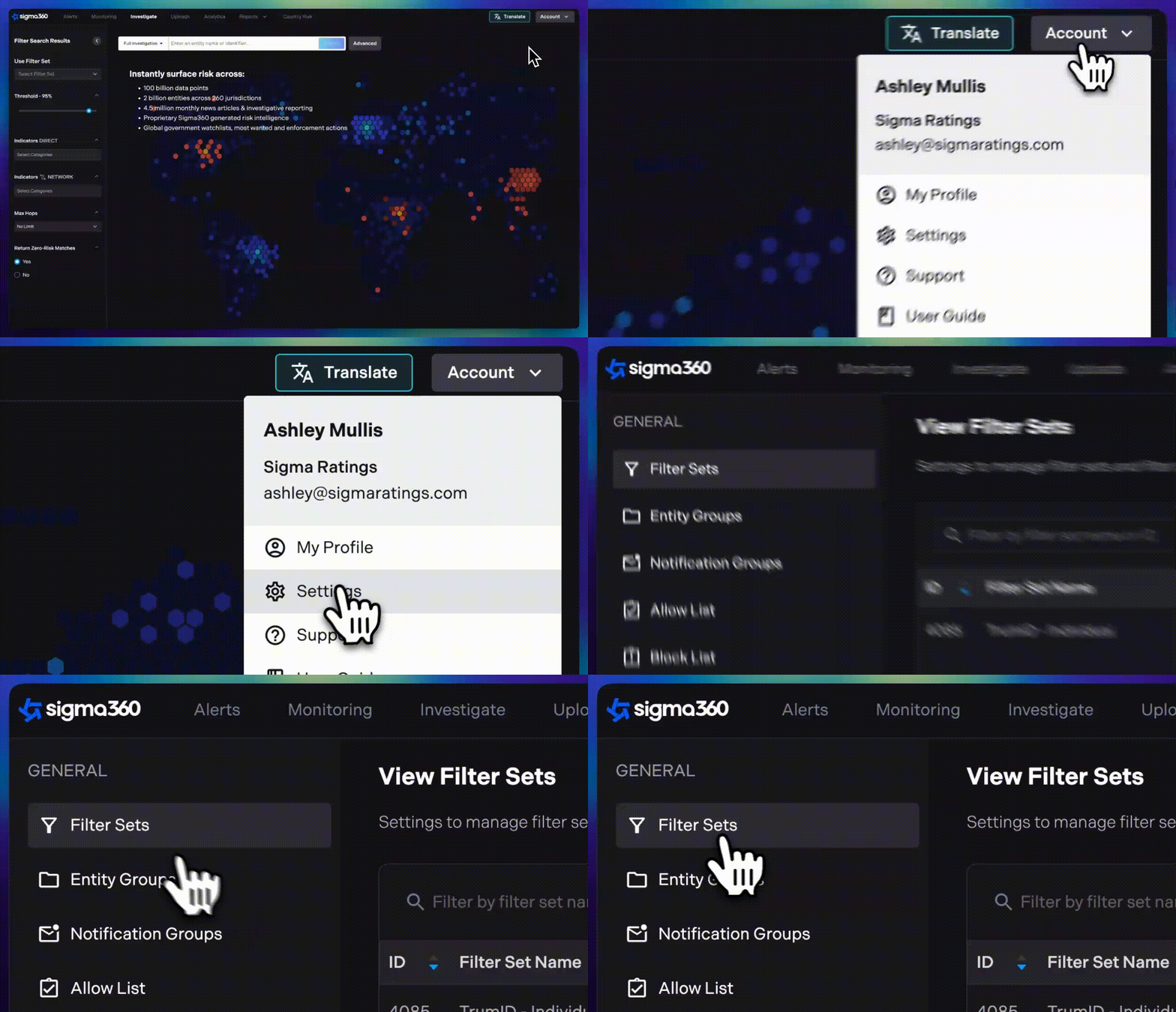
1. Log into your Simga360 account and navigate to your Account Settings. Once there, select Filter Sets in the left hand navigation.

Access Filter Settings

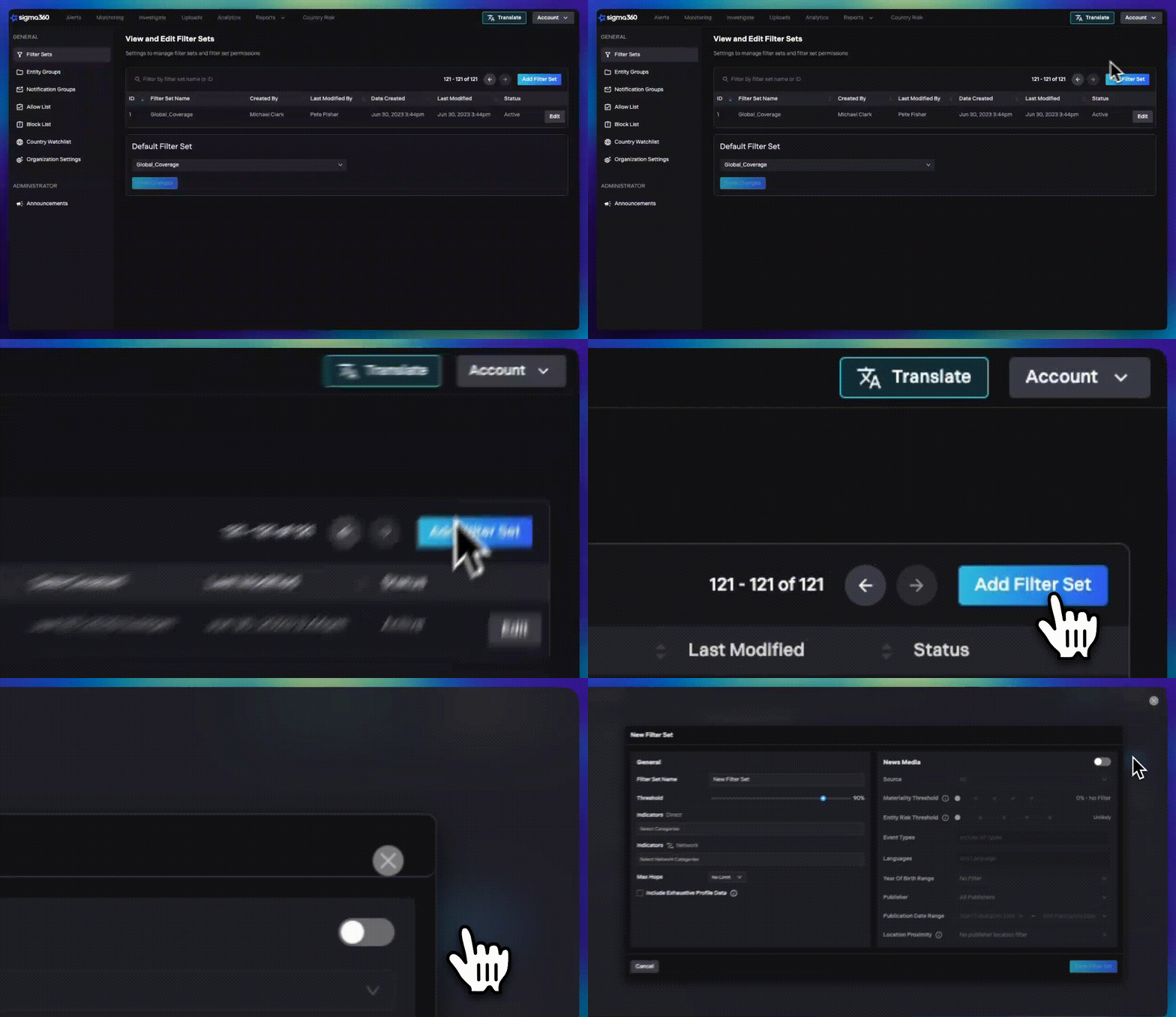
2. To create or edit a filter set, click Add Filter Set to create a new one, or choose an existing filter set to modify. 

Step 2 - Create or Edit Filter Set-1

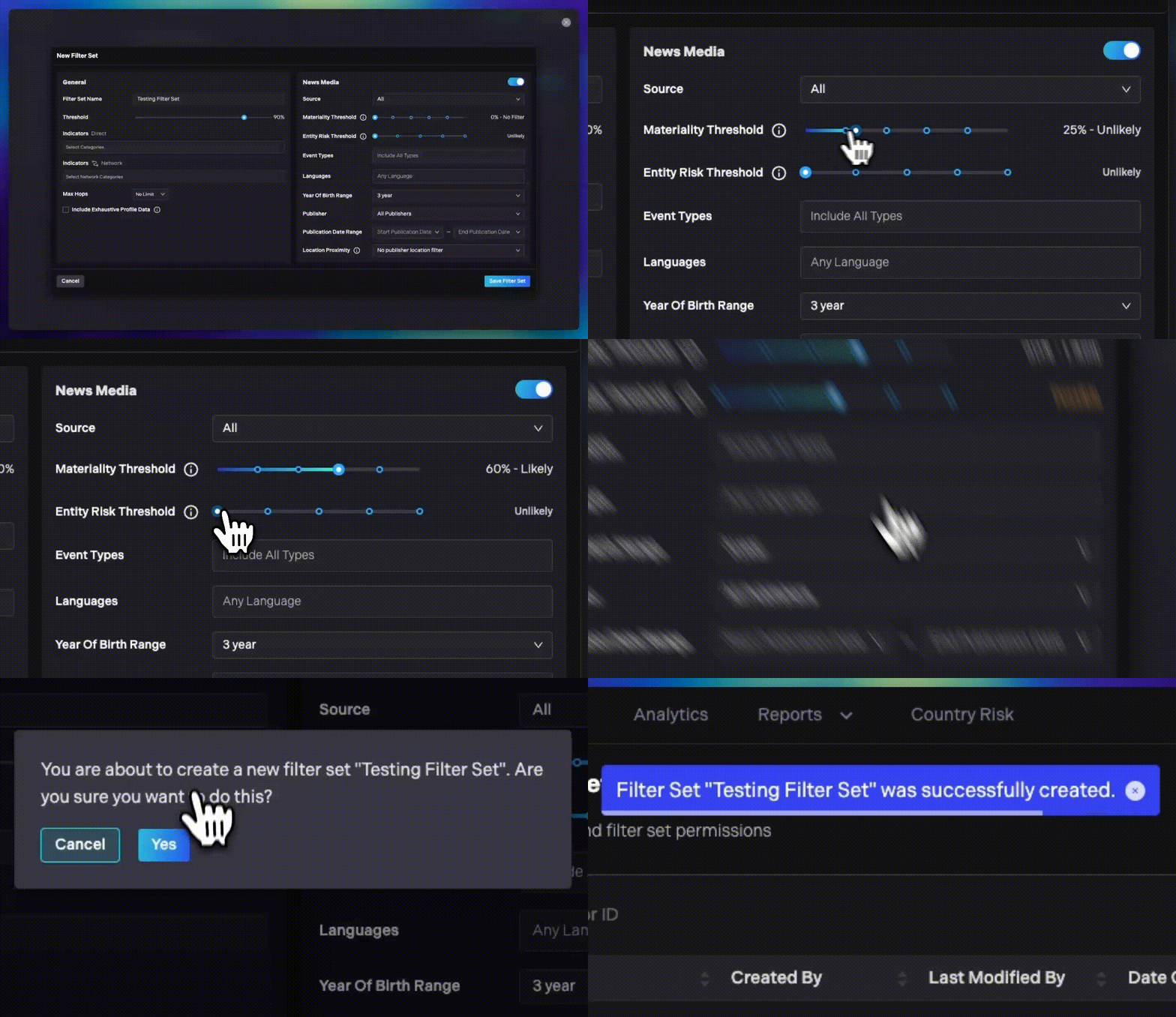
3. In the News Media section, locate the Materiality Threshold slider. Adjust the slider left or right to increase or decrease the threshold. We recommend starting at 60% for optimal filter settings.

4. Next, find the Entity Risk Threshold slider in the News Media section. Adjust it left or right to set the desired threshold, with “Possible” as the recommended starting point.

5. Once you’ve adjusted both sliders, click Save to apply the changes. Your new filter set is now active and ready for use.

Step 3 - Adjust Threshold and Save Filter

Need help? Our Customer Support Team is here to assist you every step of the way. If you have questions or need further guidance, reach out at support@sigma360.com.

Sigma Loading